Firestarter AI Dance: Make a Video From One Photo
A practical guide to the Firestarter AI dance: how one photo becomes a glowing neon dance video, which photos work best, pricing, refunds and FAQs.
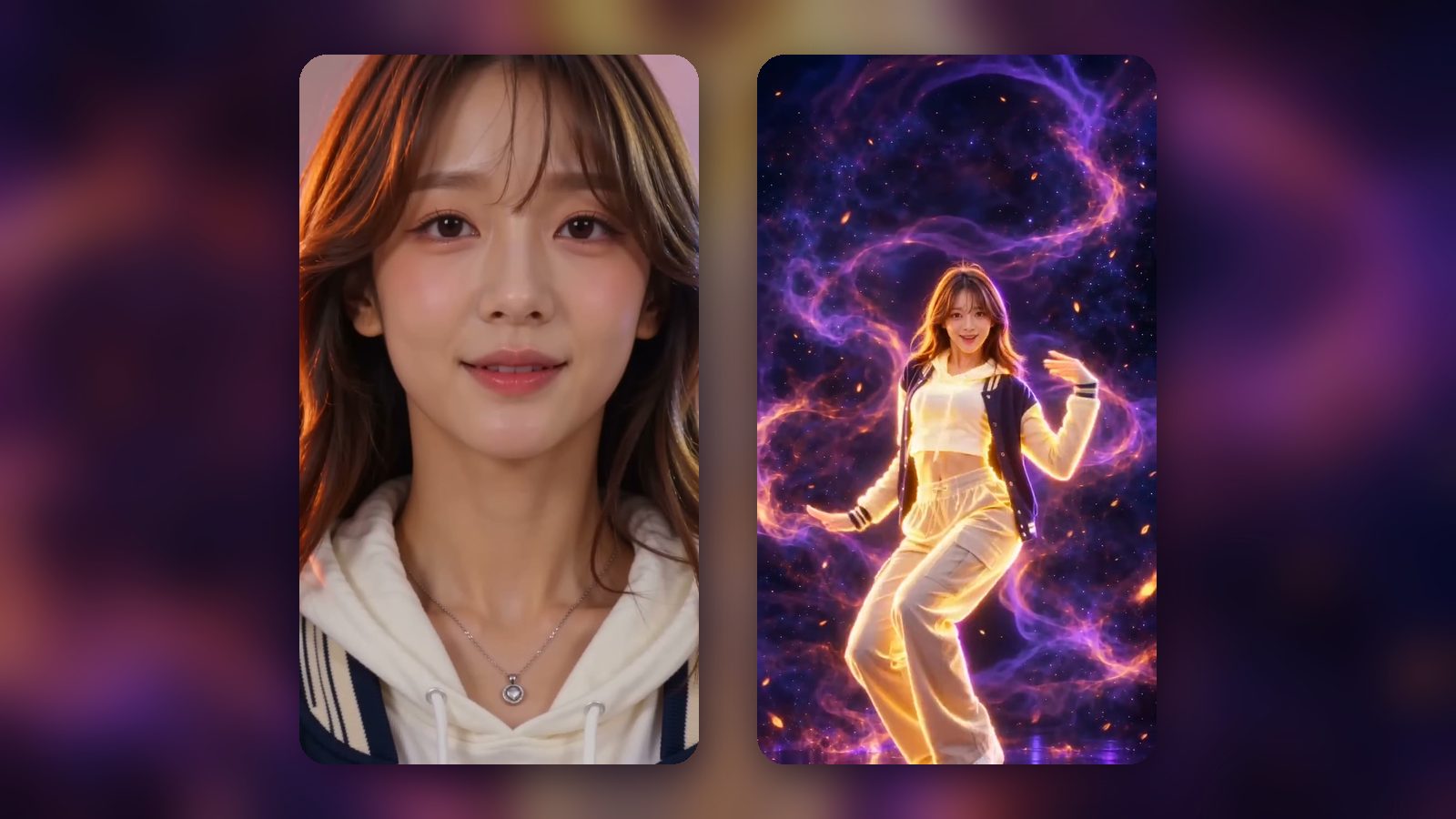
The Firestarter AI dance trend lets you join the K/DA FIRESTARTER wave without learning a single step. You upload one photo, and a few minutes later you get a 14-second vertical video of that person, character or pet dancing a FIRESTARTER-inspired routine, glowing gold among purple smoke. This guide explains how the generator works, how to pick a photo that gives a great result, and what it costs.
How the Firestarter AI dance generator works
The Firestarter AI dance generator turns a single still image into a short dance video. Here is what you get:
- Format: a 14-second, vertical 9:16 HD video, ready for TikTok, Reels and Shorts.
- Sound: the original sound is already synced to the moves.
- Your look stays yours: the face, hair and outfit from your photo are kept throughout.
- The scene: the video opens on your subject in normal light. Then, on the beat, it hard-cuts to a glowing golden, neon version of them among purple smoke ribbons.
- The moves: low-angle hero close-ups, a high standing kick, a vogue catwalk strut and arms framing the head, inspired by the K/DA FIRESTARTER choreography.
Generation takes about 3 to 8 minutes. You do not need any editing skills or an app; everything happens in the browser after you sign in with Google.
What makes a good photo
The photo is the single biggest factor in how your Firestarter AI video turns out. The model needs to see one clear subject, a readable face and enough of the body to build the dance.
Do
- Use a photo of one person (or one character, or one pet).
- Make sure the face is clear and unobstructed: no hands, hair, masks or sunglasses covering it.
- Choose a sharp photo with even light from the front.
- Frame it half body or full body, with some room around the arms.
Don't
- Group photos, even if you are in the middle.
- Heavy blur, strong beauty filters or dark, moody scenes.
- Photos where the head or hands are cropped out of the frame.
- Photos of anyone you do not have permission to animate, photos of minors, or photos of celebrities and public figures.
A quick summary:
| Works well | Causes trouble |
|---|---|
| One subject, facing the camera | Group photos |
| Sharp focus, even front light | Blur, heavy filters, dark scenes |
| Half or full body, arms visible | Cropped head or hands |
| Your own photo, or one you have permission to use | Celebrities, public figures, minors |
Step by step: make your Firestarter dance AI video
- Sign in. Open the homepage generator and sign in with Google.
- Upload one photo that follows the tips above.
- Start the generation once your photo is uploaded.
- Wait about 3 to 8 minutes while the video is generated.
- Watch and download. You get the 14-second 9:16 HD clip with the sound already in place.
- Share it. Post it with tags like #kda #firestarter #firestarterkda #kaisa. If you want ideas for captions and timing, our guide on how to do the Firestarter KDA dance has a section on posting.
Pets and original characters
You do not have to use a photo of yourself. The generator also works with:
- Pets. A cat or dog hitting the vogue strut is exactly the kind of clip people share. Pick a photo where the pet is facing the camera, sharp and well lit, with its whole body in frame if possible.
- Your own original characters. If you have a character you drew or designed, upload a clean, front-facing image of it. The same rules apply: one subject, clear face, nothing important cropped off.
In both cases the look from the photo carries through to the video, so your cat stays your cat and your character keeps its outfit.
Pricing and refunds
Pricing is simple and one-time. There is no subscription.
| Pack | Price |
|---|---|
| 1 video | $9.90 |
| 3 videos | $26.90 |
| 5 videos | $39.90 |
- Credits never expire, so you can buy a pack now and use it later.
- If a generation fails, it is refunded automatically.
See the pricing page for the current packs.
A note on the music
The FIRESTARTER song belongs to its rights holders. Your video is meant for personal sharing. If a platform mutes it, choose the sound from that platform's own music library and it will play as normal.
FAQ
How long does a Firestarter AI dance video take?
Usually about 3 to 8 minutes from upload to finished video.
Will the video still look like me?
Yes. The face, hair and outfit from your photo are kept. In the second scene you appear in a glowing golden, neon style, but it is still recognisably you.
Can I use a group photo?
No. Use a photo with one subject. Group photos confuse the model about who should dance, so crop or choose a different photo.
What happens if my video fails?
Failed generations are refunded automatically, so you do not pay for a video you did not get.
Is this an official K/DA product?
No. Firestarter AI Video is an independent fan tool. It is not affiliated with or endorsed by Riot Games, League of Legends or K/DA. If you want the background on the song itself, read our K/DA FIRESTARTER comeback explainer.
More answers are in the FAQ on the homepage.
Ready to try it?
Pick your clearest photo, upload it to the Firestarter AI dance generator, and in a few minutes you will have your own 14-second glowing dance clip to share.